Sunday, 3 July 2011

Top Four Web Browsers


No: 1 

Firefox 4 

Publisher: Mozilla
Version: 4
Firefox remains the most-recommended web browser for Windows, Mac OSX and Linux users. Reviews say Firefox 3 and (and its 3.1 beta) are even better, using less memory than earlier versions and incorporating other improvements as well. It's by far the most customizable web browser, with thousands of add-ons available. For speed, Firefox rivals the new Google Chrome browser.
Pros: The speed of the browser, the simple interface and unique features such as tab groups make this a strong browser.
Cons: Firefox doesn’t offer thumbnail previews or native mouse gesture compatibility.

No: 2


Google Chrome

Publisher: Google, Inc.
The new Google Chrome browser is stripped down for fast browsing, with superb built-in search features, private browsing and a task manager to help prevent crashes. Chrome also makes it possible to use Google desktop applications offline. However, it's still a work in progress with few add-ons available, and since it's so new, some sites won't display properly. Chrome is Windows-only.
Pros: Chrome separates each tab into its own process, protecting your system and making it the most secure browser around.
Cons: If you leave a tab idle for a period of time, it takes a while for it to refresh.

No: 3


Internet Explorer 9

Publisher: Microsoft
Version: 9
Reviews say that if you don't want to switch from Internet Explorer, upgrading to version 8 over version 7 is a good choice. Although IE8 is now more resistant to crashes and offers private browsing, it's still much slower and uses more resources than Firefox, Chrome and Opera. But reviewers do agree that Internet Explorer 8 is a big improvement over version 7.
Pros: Internet Explorer is the only browser to offer every technical support feature we looked for.
Cons: As the most common browser, most malicious attacks take advantage of Internet Explorer’s security holes.

No: 4


Opera 9.6

Publisher: Opera
Version: 9.6
Reviews and tests recommend the free Opera web browser as fast and lean, especially for older or underpowered PC and Mac computers apt to bog down on more resource-hungry browsers. Despite its small file size, Opera beats the other browsers in compliance with web standards, and builds in loads of convenient features. It runs on Windows, Mac or Linux, and excels in synchronization. Reviews also praise its mobile version.
Pros: Opera’s startup and browsing speeds are some of the best we’ve seen.
Cons: This browser has frequent conflicts with compatibility.


Summary : 

Google Chrome has hit 20 percent market share, according to StatCounter. Net Applications has Chrome cracking 13 percent. Either way, Chrome is growing fast versus IE and Firefox.

Saturday, 2 July 2011

Mobile Phone History with Pictures.

The history of mobile phones records the development of interconnection between the public switched telephone systems to radio transceivers.


Dr. Martin Cooper of Motorola, made the first US analogue mobile phone call on a larger prototype model in 1973. This is a reenactment in 2007


The first call ever placed on a commercial GSM (Global Standard for Mobile) phone was on 1 July 1991. Harri Holkeri, governor of the Bank of Finland, telephoned the mayor of Helsinki to talk about the price of Baltic herring.
September 1993 saw the launch of One 2 One, the first GSM 1800 all-digital network in the world.
SMS - the Short Message Service - was launched in 1994 enabling short text messages to be exchanged between mobiles.
1997 Japan Introduced First TV Mobile Phone (Black and White)


1997 Ericsson introduced Model No : 738 . Light weight.
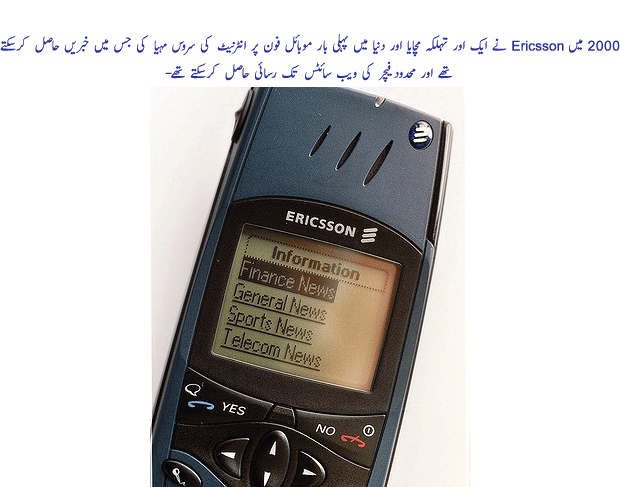
2000 : Ericsson introduced Internet service facility on mobile phones.
2003 : Nokia introduced N-gage Model ( Games).
2004 : Nokia Introduced Model 7280. New look and design.
2007 : Era of iPhone begin. Apple launched first iPhone with 8 GB memory.
2010 : Google introduced Android Technology.

Facebook CEO says awesome launch next week .


Facebook’s CEO Mark Zuckerberg said that the social network has plans to “launch something awesome” next week.
He didn't reveal any further details other than that the project was developed on Facebook's 40-person Seattle campus, its only other engineering site outside of Palo Alto, California, where it's based. There’s no official word on what will be announced, but we suspect it’s going to be the new iPhone photo-sharing service that we saw just last week. 
So wait and watch what will be awesome launch by Faccbook.

Friday, 1 July 2011

Switch from Facebook to Google+

On Tuesday, Google introduced a social networking service called the Google+ project — which happens to look a lot like Facebook. The service, which is initially available to a select group of Google users who will soon be able to invite others, will let people share and discuss status updates, photos and links, much as they do on Facebook.

Instant Upload

  
Taking photos is fun. Sharing photos is fun. Getting photos off your phone and on to the web is pretty much the opposite of fun. That's why we have created Instant Upload: So that from now on, your photos upload themselves. You don't even have to say 'cheese'.

Easier to Find Stuff to Share

Google+'s Sparks feature is another important differentiator from Facebook. Spark is Google leveraging its search engine to do something Facebook can’t do—give users an instant wellspring of relevant information to share with friends. Because Facebook has no search engine, its users must leave the site to find shareable data or wait for their friends the share it with them. The question "how do I find stuff to share" is immediately answered with Sparks.

Better Photo Tagging

When viewing photos in Google+ you can “tag” the people in them similar to the way you do in Facebook. You draw a little square around a person's face, then type in their name in the box below it (or choose one of the names Google+ guesses). But there’s a big difference in the way Google handles the privacy aspect of photo tagging. When you tag someone, you see this note: Adding this tag will notify the person you have tagged. They will be able to view the photo and the related album.”Facebook, on the other hand, does not make an effort to warn people the they’ve been tagged (possibly in an unflattering or compromising photo) and give them an immediate chance to remove the tag.

Circles

 
You share different things with different people. But sharing the right things with the right people shouldn't be a hassle. Circles makes it easy to put your friends from Saturday night in one circle, your parents in another and your boss in a circle all on his own – just like in real life.